Hi everyone! I'm sure it's happened to you too that someone asked you:
So where's this site's web server?
Who handles the email?
Where is it registered?
Well, there's a handful of commands that give you exactly all this information.
Let's take a famous domain as an example, apple.com.
To answer the first question, you need to know that the website usually lives on the www. subdomain (though not always)
So, first of all let's try visiting the site, and take the address we see in the browser
In this case the site lives on the www.apple.comsubdomain. The command to find out where the web server is goes like this
bash
ping www.apple.com
The output will be the following
So we can assume the web server's ip is 23.63.233.74 . Now let's see which addresses apple.com's main A record answers to instead. We use the dig command
bash
dig A apple.com
[Screenshot 2016-01-13 at 13.53.52: image not recovered]
It does NOT match; in this case it's probably an entry point that does some kind of redirect to another IP address. We can also see there are 3 different ips pointed at it, meaning that for better stability they decided to have apple.com answer on several entry points using the DNS round robin technique (I won't go into detail on that in this guide).
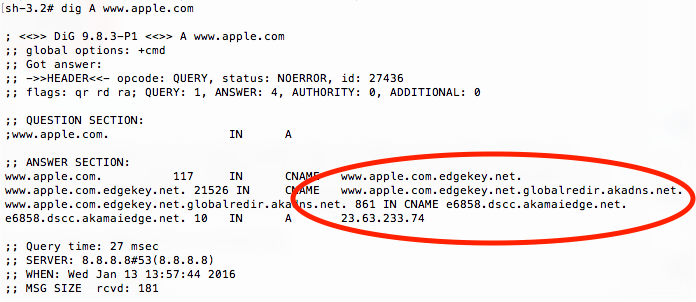
Let's look at the settings for www.apple.com, again with the dig command
bash
dig A www.apple.com
A first result from this
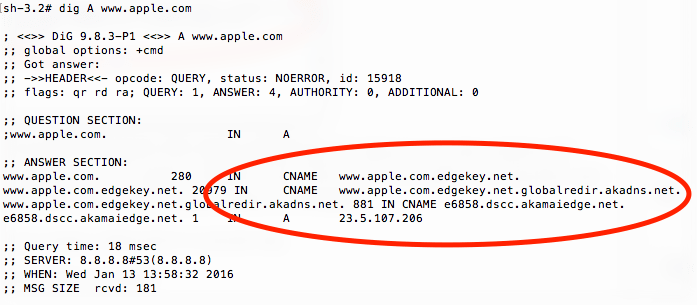
But if we run the command again we get a different ip address, probably because here too there's a series of redirects at the cache server level that we can't figure out by digging
With simpler domains you get single results, which give a much more precise picture of the overall setup.
On to email. To quickly find the mail exchange points, a single command is enough
bash
dig MX apple.com
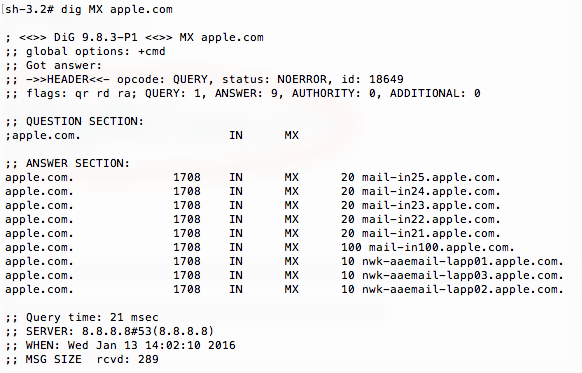
The output is the following
It means there are 9 ip addresses (maybe with clusters of servers behind each single ip) that can receive email for the apple.com domain
We could try pinging one of these subdomains to see where they're located, but in this case it doesn't make much sense.
So let's move on to who owns and who registered the apple.com domain. We use the whois command
bash
whois apple.com
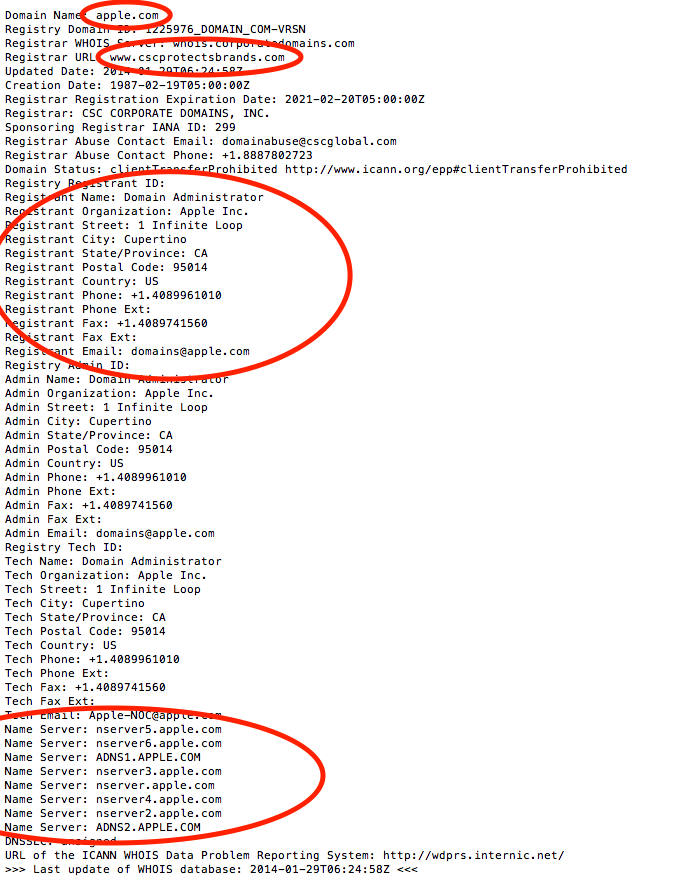
The part of the output we care about is this
We can see who manages the domain, apparently www.cscprotectsbrands.com, who the registrant is, "Domain Administrator" (in this case, for privacy reasons, they probably put a fake one), and which authoritative dns servers handle this domain.
There you go, with all this information we can answer the three questions at the start of the post! 🙂