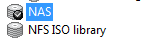
Assuming you've already connected an NFS share to Xen Server, you should have a situation like this:
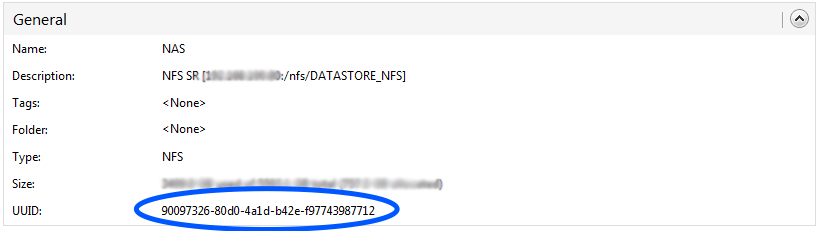
Where NAS will be our NFS share. Let's look in the share settings for the id Xen assigned to it
So let's grab the UUID.
The next step is to create a folder on the server that will hold the backup scripts, for example /SCRIPT_HOT_BACKUP/, where we'll put two files:
name_macchine.txt
backup.sh
In name_macchine.txt we'll put, one per line, the names of the machines we picked earlier for the backup, in our case
text
Macchina1
Macchina2
And we'll write the following script:
text
#!/bin/bash

SRUID=90097326-80d0-4a1d-b42e-f97743987712

for fn in `cat /SCRIPT_HOT_BACKUP/name_macchine.txt`; do

echo $fn
DATE=`date +"%Y-%m-%d %H:%M:%S"`
SNAPUID=`xe vm-snapshot vm="$fn" new-name-label="$DATE backup $fn"`
xe snapshot-copy new-name-label="$DATE backup $fn" new-name-description="backup di $fn di $DATE" uuid=$SNAPUID sr-uuid=$SRUID
xe snapshot-uninstall force=true snapshot-uuid=$SNAPUID

echo "FINE $fn"

done
As you can see there are a few variables; the only important one to set is SRUID, which will hold the id of the NFS share chosen earlier.
This script will go through every machine name in the name_macchine.txt file and take a snapshot, save the snapshot as a template, and destroy the snapshot.
Once the backup is complete, you'll see the templates in Xen Center! (the GUI management client)
From the command line you'll get output like this:
text
Macchina1
f3b53574-fe45-f831-665e-ed7d8e59cf24
The following items are about to be destroyed
VM : b190bd5b-ca78-506c-571d-a6471eda7d04 (2016-04-15 21:38:42 backup Macchina1)
VDI: a3fc1deb-4f73-4d6b-98e9-206a3441c2b0 (New virtual disk (14))
All objects destroyed
FINE Macchina1
And that wraps up this little guide to zero-cost hot backups!
🙂
~/archivio
$ cat ~/archivio/xen-server-hot-backup.md
WARNING: this file is from 2016.
I wrote it, but a me from a few years ago: it may no longer reflect what I think or what I can do.